Localized changes
This sample shows six localized changes. That number is not the total number of findings in the technical report.
Picasso CPI Governance Assessment
We evaluate SAP CPI / SAP Integration Suite landscapes from technical evidence, even when the client cannot grant direct tenant access.
Picasso CPI Governance Assessment turns ZIP exports, snapshots and safe metadata into a traceable inventory, a difference matrix and a DevOps roadmap. Offline/file-based assessment is the primary path; API Assessment can be evaluated with read-only access, authorized scope and controlled validation.
If you prefer to confirm scope or assessment mode first, open WhatsApp with this context.
New capability · Deep iFlow Diff
For example, use the iFlow exported from DEV as the Base (baseline) and its version exported from QA or PRD as the Compared version. Locate changes on the diagram and review differences between environments with technical evidence.
Actual report screenshot · approved sample
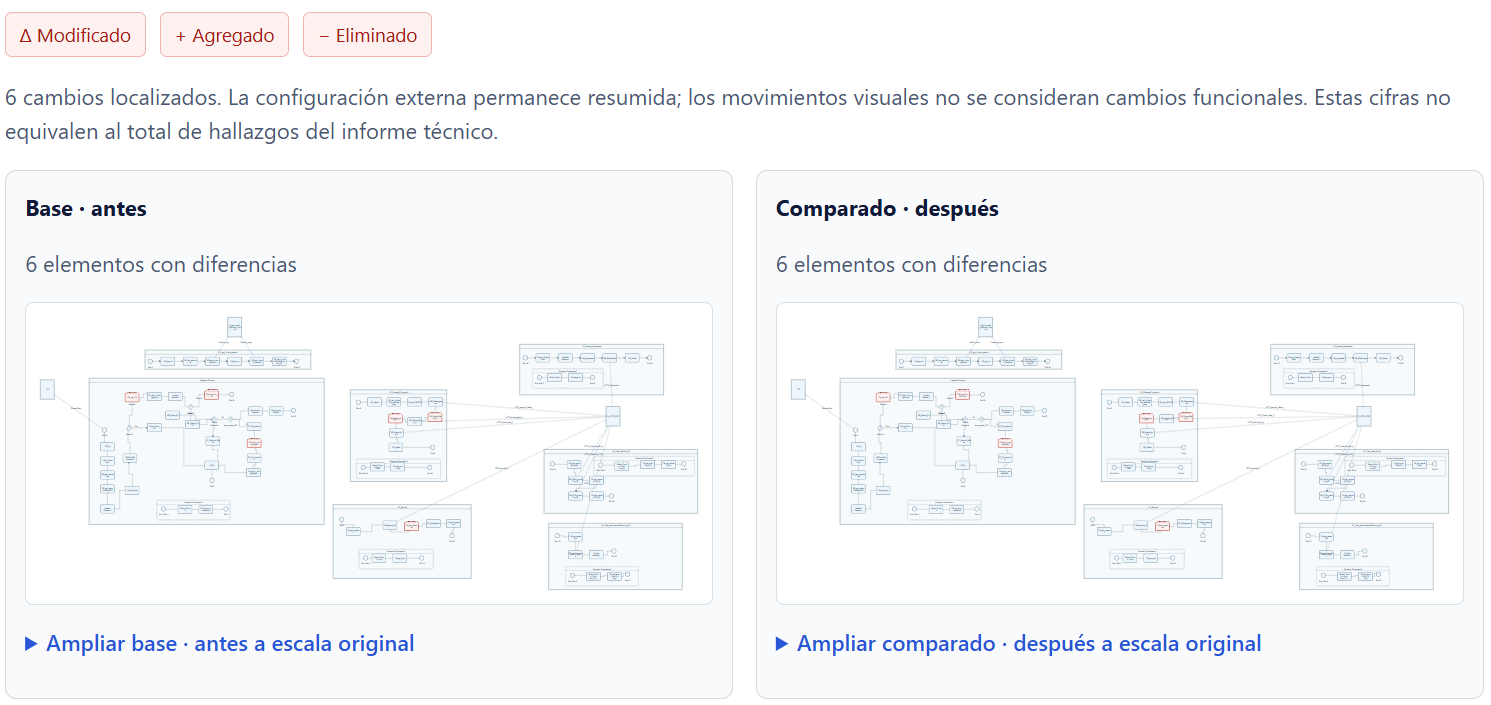
Red means a difference, not necessarily an error.
This sample shows six localized changes. That number is not the total number of findings in the technical report.
Available positions and connections help locate differences. Visual movements alone are not treated as functional changes.
Script or mapping changes can highlight their nodes when an explicit, verifiable reference exists; this does not interpret all of their logic.
Compare versions or environments on the flow, alongside technical evidence.
Find modified, added or removed nodes and connections.
Focus on functional, technical and structural changes. Externalized parameters are summarized while risk exceptions stay visible.
Bring the visual review and technical detail into documentation and team discussions.
The exported HTML opens with comparative views, a legend and annotations, followed by the technical report. It can be read without keeping the application open.
In the reviewed samples, you can follow internal links to details and expand a full-scale view to scroll through the diagram. These are report controls; the application's interactive tools are not being attributed to the HTML.
Let's agree on versions, sources and assessment scope.
SAP CPI often starts as a quick response to integration needs: connecting SuccessFactors, HCM, payroll, WFM, APIs, ERPs, external systems or critical business processes. Over time, packages grow, iFlows multiply and each environment starts telling a different story.
The problem is not having many interfaces. The problem is not knowing with certainty what exists in each environment, what changed, what reached production, what configuration is out of control and what technical risk may affect the next deployment or a future migration.
Picasso CPI Governance Assessment does not stop at listing iFlows or producing a decorative report. We build real visibility over the integration landscape, identify differences across environments, document technical evidence and translate findings into concrete actions.
The assessment is supported by internal analysis capabilities to review available exports, snapshots and configurations. We do not infer dependencies without technical support and we state limitations when evidence is not enough for a responsible conclusion.
The promise is simple: understand what you have, where your environments differ, what risks exist and what actions to take to govern SAP CPI integrations better.
Designed for multiple environments, critical integrations, inherited tenants, go‑live pressure or scenarios where architecture and PMO need evidence before deciding.
Client/project/environment registry (DEV, QA, UAT, PROD or others) with runtime identification, safe metadata and deterministic hashes.
Differences by existence, version, endpoints, adapters, parameters, configuration and resources, including equivalences when names do not match.
Technical extraction and review when evidence exists: Groovy, JavaScript, XSLT, mappings, WSDL/XSD/EDMX, properties/parameters and referenced or unused resources.
Findings with severity, category, auditable evidence and recommendation, separating expected per-environment differences vs items that require review.
We do not store secrets in plain text or print tokens/passwords/certificates. Credential references are reported as Security Material objects that require an owner and process.
BTP dependency signals, configuration and relevant tasks before planning a transition from Neo to Cloud Foundry.
We work with ZIP exports of packages or iFlows by environment when the client cannot allow direct access. We process local evidence, generate snapshots and do not retain the original ZIP by default.
When the client authorizes read-only access, we evaluate a controlled capture limited to available roles, permissions and capabilities. It is not presented as a production connector or runtime monitoring.
For formal comparison, all active environments must be captured from the same source: equivalent ZIP exports, or an authorized and validated API capture. If evidence is mixed, it is declared as a limitation and we recommend homogeneous recapture before concluding environment differences.
When the client authorizes direct access, we can evaluate a capture limited to available permissions. The result reflects the capture moment, role-enabled capabilities and technical limitations of the environment.
When direct tenant access is not available, the client provides exports by environment. This reduces security friction and allows sanitized technical evidence review while stating that it does not replace runtime validation.
For clients still operating SAP CPI on Neo, we include a readiness view that identifies signals, dependencies and relevant tasks before planning a transition to Cloud Foundry.
Technical analysis depends on what the client provides or enables per mode. We do not “guess” what is not supported by evidence.
Findings are delivered with structure and evidence: severity, category, impact and rationale. When applicable, we reference SAP documentation and clearly declare limitations by information source.
The assessment is responsible with what it can conclude. Offline analysis depends on export quality and completeness. API analysis depends on roles, authorizations and enabled capabilities.
Detect environment differences and prioritize actions before go‑live, hypercare or critical deployment windows.
Reduce dependence on informal knowledge and give visibility to architecture, PMO, support and SAP teams.
Turn technical findings into a plan to mature governance, documentation, transports, migration readiness and operation.
For SAP consulting firms and partners, the assessment works as a technical validation layer before go‑live, support or project transition. Picasso T&S can act as the architecture arm when integration becomes the delivery bottleneck.
Validate differences and risks before moving critical integrations.
Organize CPI landscapes with insufficient documentation or multiple teams involved.
Confirm which iFlows, endpoints, adapters or configurations are not aligned.
Evaluate read-only capture only with formal authorization, clear permissions and prior technical validation.
Analyze ZIP exports by environment when direct access is not possible.
Identify risks, dependencies and tasks before planning a migration from Neo to Cloud Foundry.
Before reviewing the landscape, we define modality, scope and available evidence. The assessment can be complete or limited to critical packages, environments or iFlows.
You do not need to wait until go‑live, audit or migration to discover environment differences. We can start with Offline/File-based Assessment using ZIP exports and evaluate read-only API only with formal authorization and controlled validation; if evidence is not homogeneous, we define the right recapture first.
Request SAP CPI assessment Continue on WhatsApp